
Tech
Phishing E-mails: How to Distinguish Safe E-mails and the Top 10 Most Imitated Companies
DHL, Microsoft, Amazon, WhatsApp and many more top companies are on the top 10 in Check Point Research’s list of most imitated brands by cybercriminals in Q4 2021. But, how can you distinguish a phishing e-mail?

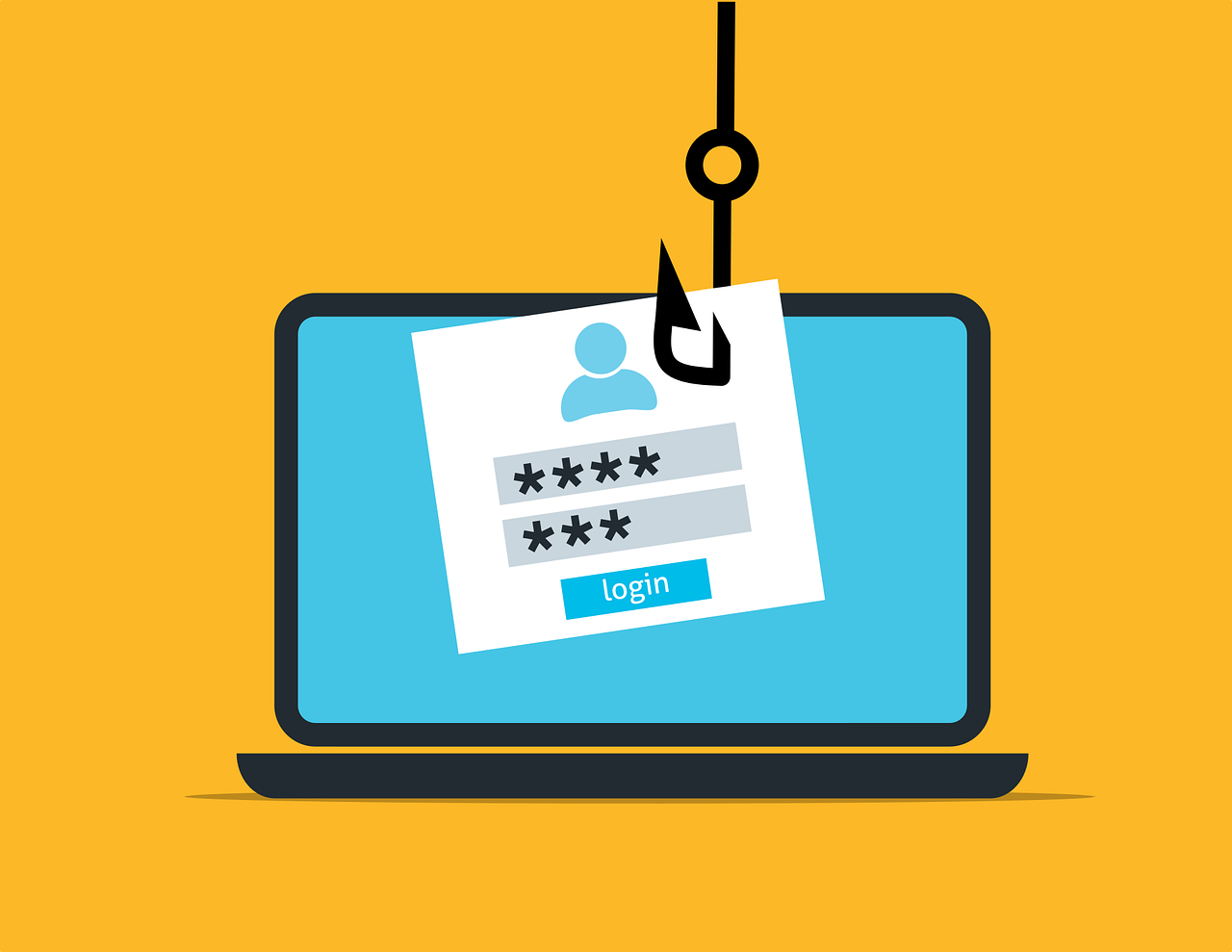
According to a recent report from Check Point, the most imitated brands for phishing e-mails top 10 included tech giants like Microsoft, Amazon, WhatsApp, Google, and LinkedIn. While it is interesting to see that the scammers are trying to imitate the most well-known companies, it reminds us to learn more about how to distinguish the real from the fake. In the end, it is mostly the user who causes the security breaches and it is important to learn not to fall for the “phishing e-mail” trap.
Pixabay
What is a Phishing E-mail and why do they imitate big companies?
A phishing e-mail is a type of hack that requires social engineering. Usually, the hacker sends a fraudulent message that seems convincing and official and tries to convince you to click or sign in through their given link or portal. In the end, the hacker gets your credentials and gets access to your data. The reason why they imitate big companies is that they are trying to increase the convincing nature of the e-mail. In fact, since we use the services of top companies every day, it becomes even easier to click or sign in through a whim and realize that we have been hacked. Therefore, read every e-mail twice if it requires you to sign in or click something.
Also, the data from Check Point suggests that these are the top 10 most imitated companies for cybercrimes:
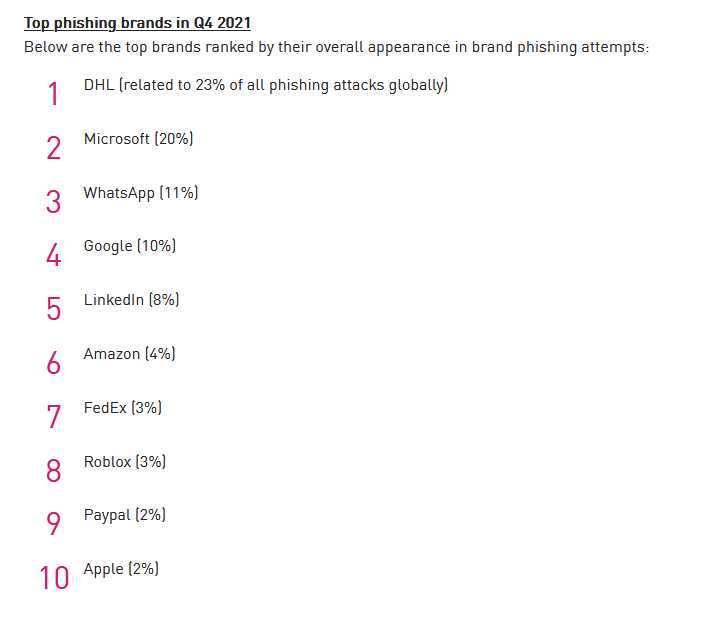
Check Point
How can you distinguish a phishing e-mail from others?
To a trained eye, distinguishing these kinds of e-mails is not very hard. However, sometimes, the imitators are really professional at their job, which makes it difficult even for the best of the best to notice the difference in the flow of daily life. Despite that, here are the few things you can look out for:
- E-mails Demanding Immediate Action: Usually, if the e-mail is not a scam, no one asks for an immediate sign-in, password change, or information entering the session. So, usually, if an e-mail says “URGENT: Click here to restore BLABLA”, it is usually a sign that it is a fraud.
- E-mails Requesting Sensitive Data: Usually, sensitive data such as your password, credit card numbers, and similar stuff are things you should not share anywhere at any time except for the official websites of the services you use. Even then, some scammers replicate the official website with slight changes and make it harder to detect the scam. Our advice is that if you are required to enter sensitive data, check if the portal you are using is the official website’s one. You can always check the certificates and owners of the website through your browser. So stay safe and be careful.
- E-mails with Bad Writing: It can be grammar mistakes, informal language, vague explanations, or weird words, if something seems out of place, it usually is fake. Check if your e-mail has one of these.
- E-mails with Weird Senders, Domains, Links: Ever came across an e-mail that came from “1982734727412xyzyysytausdf@wpoeıxyz.com” but the e-mail was titled “Google Security Code”. Well, that is probably a scam. Please stay away from e-mails with links that seem to be broken, domains that seem like they are randomly generated, and senders that seem like made-up names.
- E-mails with File Attachments: It is very natural for an official e-mail to have an attachment as well. However, if an attachment seems to be very weird, empty, or straight-up slow your computer, it may mean that it was used for a phishing attack. Since one can easily write “macro”s on a word document, please stay away from suspicious attachments that are empty or go nowhere. Inform an expert if you have clicked one as well.
Well, there are many more detailed things that give away a phishing scenario as well, in fact, your e-mail service probably checks for things that I have talked about above automatically. But still, some slip up. So, always try to double-check things even though you are in a hurry.
Pixabay
Even though an e-mail seems very convincing, be aware that scammers are very well equipped to produce a phishing setup for everything. That’s why they are even imitating companies that you see everywhere every day in their phishing e-mails. Therefore, especially if you are using a device that can access critical data for your company or yourself, please double-check things that you click. Even Norton had a problem with their customers because of issues like CPU access as I have written in a previous article titled “Antivirus Giant Norton’s Cryptomining Scandal: Here’s What Is Actually Happening”
Do your own research, double-check things, and always be aware of the traps that await us in the digital world. Stay safe! Both digitally and really of course!

Mariana Trench: 8 Fascinating Facts About the Earth’s Deepest Place
10 most famous scientists who contributed to astronomy and space

Top 25 extremely stunning photos of Northern Lights of 2020 revealed

Meteorite makes Indonesian man a millionaire as piece crashes through his roof
It’s Now Possible to Predict Blood Cancer With Ten-Second Videos
This Inexpensive Method Speeds up Analysis of 3D Printed Metal Parts

SpaceX Dragon: A Game Changer for NASA

Tiny fish, big boom: This small fish found to roar like a gunshot

Turkish city unveils design of Mars Colony project for tourists

Researchers Reveal the Source of the Electron Rain Phenomenon
A New Study Reveals How Climate Change Will Affect Sound Travels Underwater
Here Are 6 Space Technologies We Can Benefit to Improve Life on Earth
SpaceX Announced Crew Dragon Will No Longer Be Produced
Russia Warns Sanctions on Moscow Could Endanger the ISS
A New Study Reveals How to Make Walking Easier

Remote-control cars to race on the Moon in 2021

Space Debris Problem Is Getting Worse: Causes and Removal Efforts of Rambling Junk
Microplastic Pollution Detected in Human Blood for the First Time
Nvidia CEO declares coding’s end in AI era
Here Is Blue Origin’s Touristic Rocket: The New Shepard Design
The Fastest Manned Plane in the World: Here’s The Insane Engineering of the X-15
Here Are 6 Space Technologies We Can Benefit to Improve Life on Earth
Pentagon Formed A New Group To Investigate UFO Reports
Space Debris Problem Is Getting Worse: Causes and Removal Efforts of Rambling Junk
From New Zealand to the US: The Rocket Lab Story
Here Is Blue Origin’s Touristic Rocket: The New Shepard Design

Take a Look at Earth From Space: Glasgow, Scotland

NASA Is Preparing Next Generation Spacesuits for Moon Mission and Beyond
Remote-control cars to race on the Moon in 2021
Meteorite makes Indonesian man a millionaire as piece crashes through his roof
NASA sends a new Space toilet for astronauts to ISS

 Earth & Energy5 years ago
Mariana Trench: 8 Fascinating Facts About the Earth’s Deepest Place

 Space6 years ago
10 most famous scientists who contributed to astronomy and space
- Skywatching6 years ago
Top 25 extremely stunning photos of Northern Lights of 2020 revealed
- Engineering6 years ago
Meteorite makes Indonesian man a millionaire as piece crashes through his roof

 Science5 years ago
It’s Now Possible to Predict Blood Cancer With Ten-Second Videos
 Engineering5 years ago
This Inexpensive Method Speeds up Analysis of 3D Printed Metal Parts
- Infographic6 years ago
SpaceX Dragon: A Game Changer for NASA

 Earth & Energy3 years ago
Tiny fish, big boom: This small fish found to roar like a gunshot